Journal entry
Homelab and VPS Hybrid Infrastructure Overview
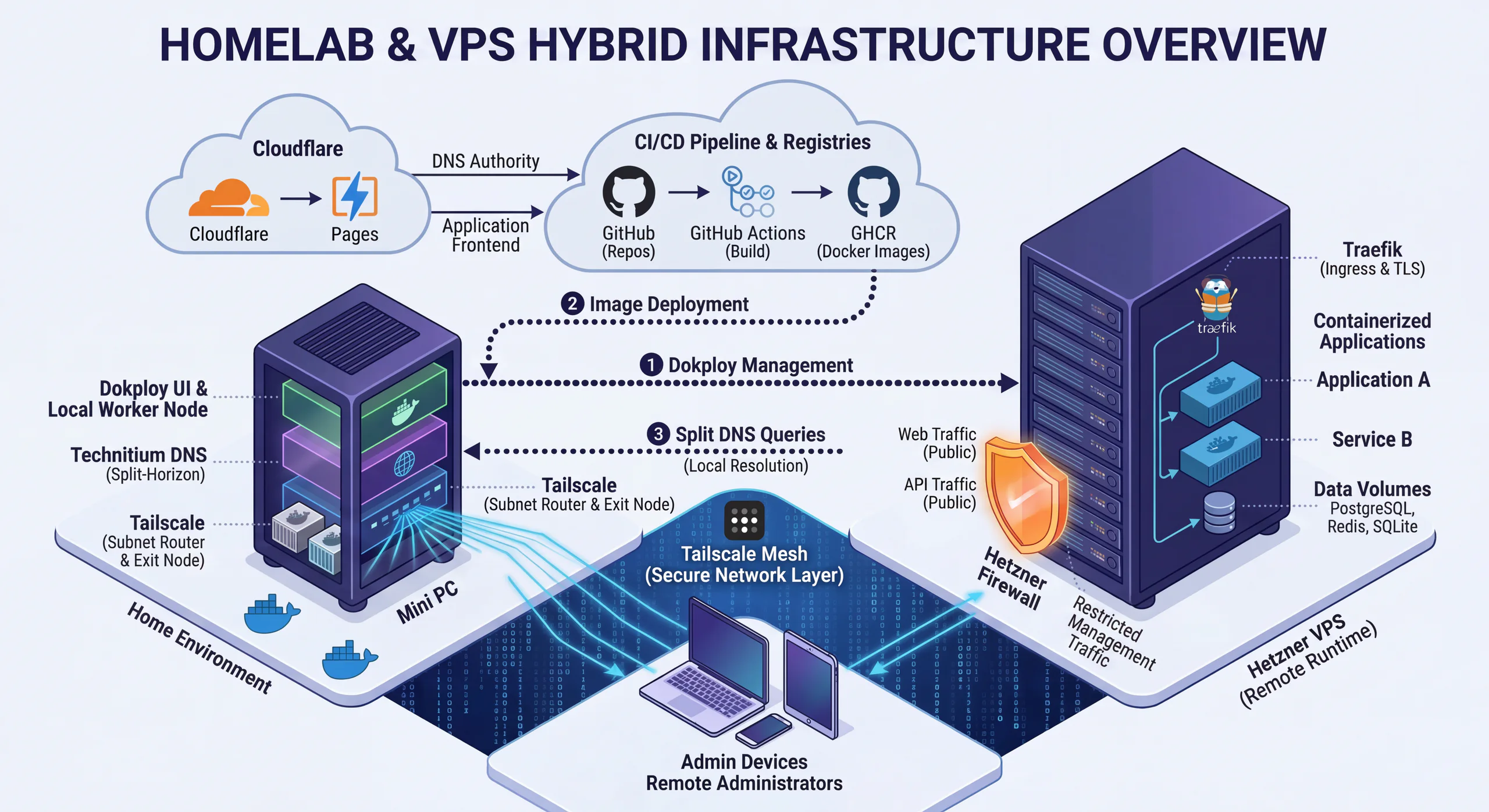
Why I Run a Hybrid Homelab + VPS Setup
Over the last few months, my infrastructure stopped being a random collection of boxes, containers, and DNS tricks.
It turned into a pattern.
What I wanted was simple:
- private control over the parts I care about most
- cheap and reliable public hosting for Internet-facing apps
- one deployment path I could reuse across personal and client projects
The result is a hybrid setup:
- a home Mini PC acts as the local control and utility node
- a Hetzner VPS runs the public workloads
- Tailscale handles secure private access
- Dokploy gives me a lightweight application platform
- GitHub Actions + GHCR provide the delivery pipeline
- Cloudflare handles DNS and, where it makes sense, frontend delivery
- ElyzeLabs is one of the privately hosted applications running on top of this setup
This post is the current shape of that stack, why I built it this way, and how apps actually move from git push to public traffic.
The Core Split: Home For Control, VPS For Runtime
I do not want every responsibility sitting on one public server.
That always sounds simpler at the beginning, but it gets worse as soon as you care about management boundaries, private access, internal services, or predictable operations.
So I split responsibilities on purpose.
At home, I keep the things that benefit from being private and close to me:
- Dokploy as the control plane
- Technitium DNS
- Tailscale routing and private access
- local automation utilities
- internal services I want reachable privately first
On the Hetzner VPS, I run the public-facing workloads:
- application containers
- ingress and TLS termination
- runtime data where needed
- public HTTP and HTTPS traffic
That gives me a simple rule:
- private coordination happens at home
- public execution happens on the VPS
It is a much better fit for the kind of systems I actually run than either extreme of "everything at home" or "everything in the cloud."
What The Home Mini PC Actually Does
The Mini PC is not just a convenience box. It is a real part of the platform.
Right now, it runs the local services that make the rest of the system manageable:
- Dokploy
- Technitium DNS for split-horizon resolution
- n8n for automation workflows
- Cloudflare DDNS to keep public DNS aligned with the home connection
So when I describe it as the home control plane, that is not abstract language. It is the place where deployment control, DNS behavior, automation, and private network reachability come together.
That is also why I do not think of the Mini PC as a toy homelab node anymore. It has become an operational dependency in the good sense: a machine with a clear job inside the architecture.
The MikroTik Edge At Home
Another part of the setup that matters is the home network edge itself.
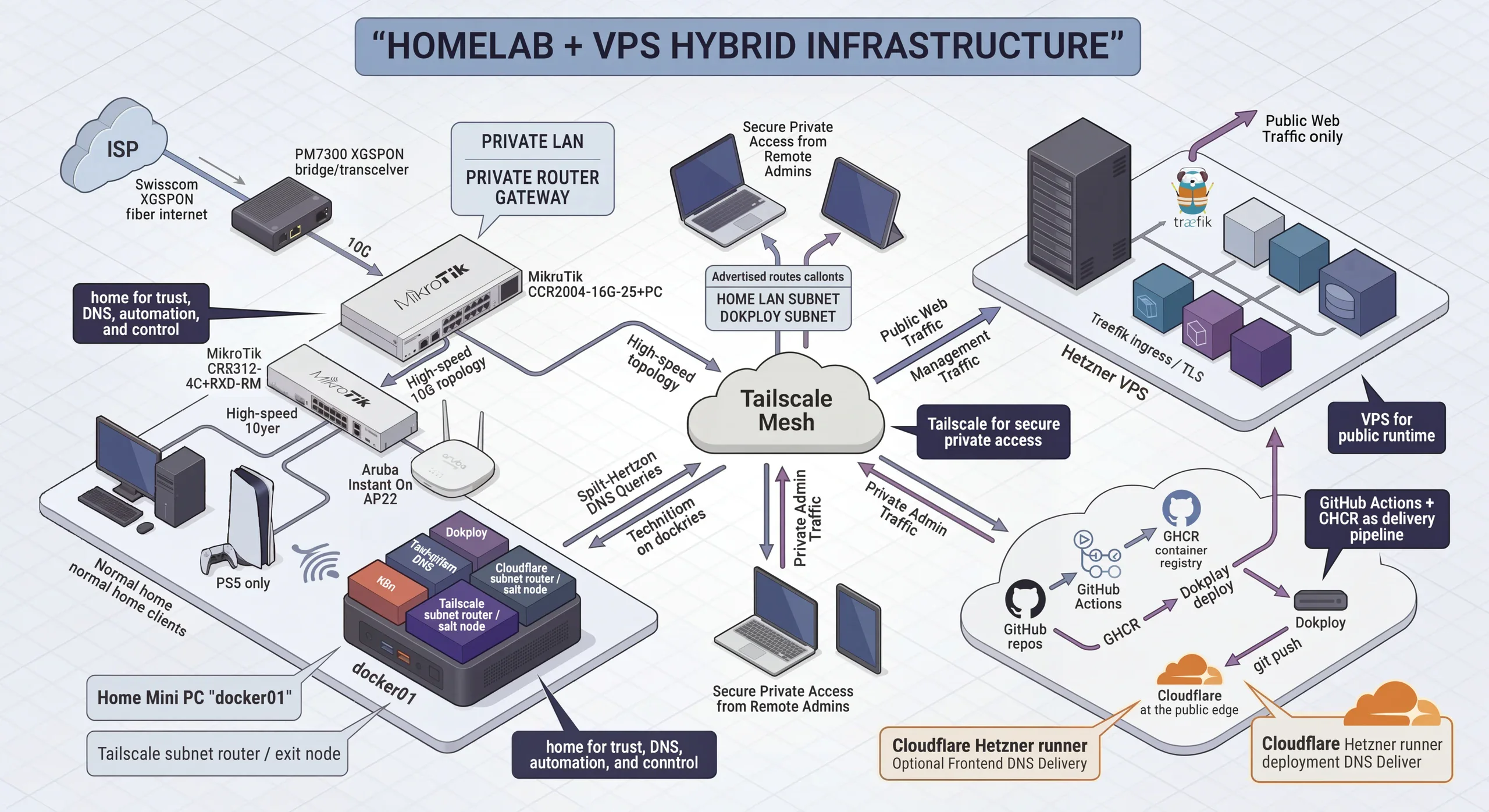
At home I run a MikroTik CCR2004, and that box does a lot of the boring but important network work:
- WAN handoff for the Swisscom connection
- LAN bridging
- DHCP for the home network
- NAT and firewalling
- DNS service for the local network
- the boundary between trusted local traffic and everything else
The configuration work there is not flashy, but it matters.
Things like disabling unnecessary services, restricting discovery, dropping public DNS requests on the WAN side, and keeping a sane firewall policy make the rest of the stack more trustworthy. The hybrid setup only works well if the home side is disciplined too.
So even though the blog post is mostly about deployment and exposure, the router is part of the story. It is the first line of structure at home.
Dokploy Is The Glue
One of the easiest things to miss in a diagram like this is that Dokploy is not some external managed service I happen to use.
I host Dokploy myself, and it gives me a clean operational layer for:
- deploying services
- managing remote runtimes
- handling domains and routing
- working with volumes and service lifecycle
What I like about Dokploy is that it gives me platform-like ergonomics without forcing me into a full Kubernetes-shaped problem.
That matters because I do not need maximum abstraction here. I need a deployment model that stays understandable while still being reusable across projects.
Dokploy is that middle ground.
Tailscale Is The Real Admin Surface
Tailscale is probably the highest-leverage piece of the setup.
It is what makes the entire thing feel operationally clean instead of fragile.
I use it for:
- remote administration
- subnet routing into my home network
- private access to internal service ranges
- secure management traffic between my devices and infrastructure
- exit-node access when I want devices to route through home
That means I do not need to expose management surfaces publicly just because I want convenient access from my laptop or phone.
Instead, I keep a hard separation:
- public app traffic goes through the public edge
- management and private resolution go through Tailscale
That single decision improved the quality of the whole setup more than most of the individual tools.
Split DNS With Technitium
Technitium is what gives the network local intelligence.
I do not always want the same hostname to resolve the same way from every context.
When I am inside the home network or inside the tailnet, I often want internal or Tailscale-reachable answers. Publicly, I want the normal public path.
That gives me:
- cleaner private access
- less manual hostname hacking
- more natural movement between local, private, and public contexts
Without split-horizon DNS, a setup like this usually accumulates a lot of ugly workarounds. Technitium keeps it feeling deliberate.
Cloudflare At The Edge
Cloudflare handles the public-facing edge concerns I do not want to rebuild repeatedly:
- DNS authority
- public hostname management
- frontend delivery where it makes sense
- DDNS integration back to the home connection where needed
This is also where the architecture becomes more practical than ideological.
Some applications are better served from the edge. Some belong on the VPS behind Dokploy. There is no reason to force every component into the same runtime just to feel consistent.
That flexibility is useful.
Hetzner As The Public Runtime Layer
Hetzner is where the public execution happens.
This is the side of the setup meant to receive Internet traffic, terminate TLS, and run application containers in a cleaner public runtime than I want to expose directly from home.
The broad model is:
- expose
80/443for public HTTP/HTTPS - keep ingress behind Traefik
- keep databases and private services off the public Internet
- restrict management traffic as much as possible
So there is a clean distinction between:
- things users should reach
- things only I should reach
That sounds obvious, but small infrastructures become messy fast when that line starts to blur.
How Deployment Actually Works
The deployment path is intentionally boring, which is exactly what I want.
In general, it looks like this:
git push -> GitHub Actions -> GHCR image -> Dokploy deploy -> public runtime
That path now works as a reusable pattern across multiple repos.
For this blog
This blog is built as a Docker image and pushed to GHCR. Dokploy then pulls and deploys it on the runtime side.
Because the blog uses SQLite and runtime uploads, persistent volumes matter. Without them, redeploys would wipe state that should survive.
For the rest of the stack
The same pattern keeps showing up across the rest of my work:
- frontend assets can live at the edge when that makes sense
- backend images are built in GitHub Actions
- images are pushed to GHCR
- Dokploy deploys the relevant services onto Hetzner
- internal services stay private unless there is a good reason to expose them
That is one of my favorite parts of the whole setup: the mechanics stay recognizable even when the application shape changes.
n8n And The Local Automation Layer
A nice side effect of the home node is that it is not only about infrastructure management.
It is also a good place to run lightweight automation without promoting every workflow into a full public application.
Right now, that includes n8n.
That gives the Mini PC another practical role:
- internal automations
- service-to-service glue
- local-first orchestration tasks
- operational workflows that do not need their own public stack
This is the kind of thing that makes a homelab genuinely useful day to day instead of just technically interesting.
ElyzeLabs As A Private App On The Stack
ElyzeLabs sits on top of this infrastructure too, but it is important to describe it correctly.
It is not the thing managing the infrastructure.
It is one of the applications hosted privately on this setup, and for me it represents another reason the hybrid model is useful: not every service needs to be public just because it is important.
In that sense, the stack is doing two jobs at once:
- it supports public-facing applications on the VPS side
- it gives me a private place to host internal or restricted applications like ElyzeLabs
That is a big part of why I like this model. It supports both public delivery and private experimentation without forcing them into the same exposure model.
Why I Like This Model
This hybrid setup hits a useful middle ground.
It is not hyperscale.
It is not homelab maximalism for its own sake.
It is not full cloud dependency either.
What it gives me is:
- private control where I care about control
- cheap public compute where I need availability
- one deployment pipeline across multiple apps
- secure remote operations without management-port sprawl
- local DNS and network authority
- a clean place to run both public services and private ones
That combination feels much more sustainable than any of the simpler alternatives I tried before.
Closing
The biggest improvement was not any single tool.
It was choosing a clean responsibility split:
- home for trust, DNS, automation, and control
- VPS for public runtime
- Tailscale for secure private access
- Dokploy for deployment ergonomics
- GitHub Actions + GHCR for reproducible delivery
- private apps and internal tooling where public exposure is unnecessary
Once that shape became clear, everything else got easier to reason about.
This is the infrastructure behind how I deploy, expose, and operate my apps today.