Journal entry
How I Automated a Legacy Desktop App Without an API
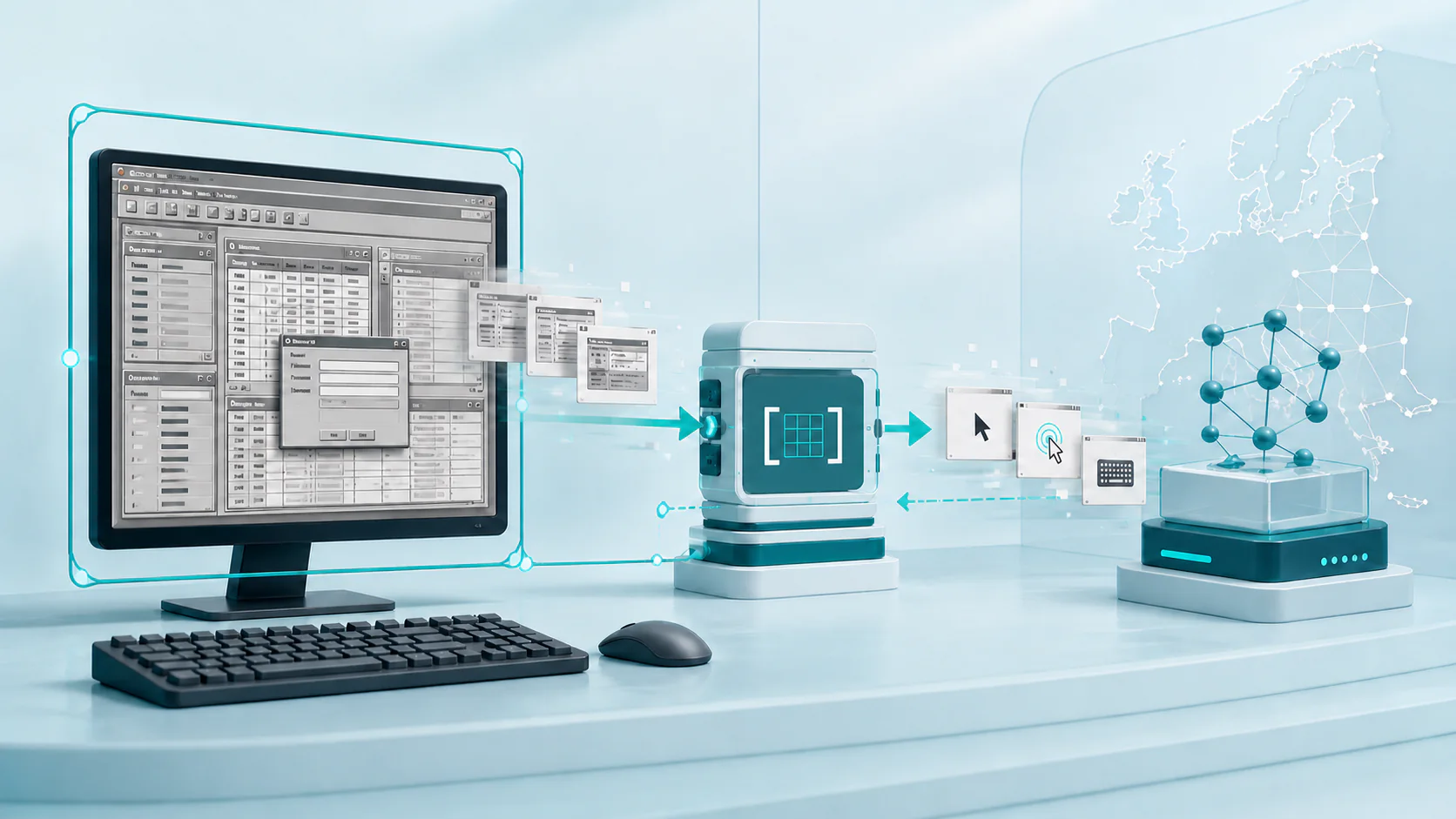
How I Automated a Legacy Desktop App Without an API
Some desktop applications are difficult to automate for reasons that have little to do with their business logic.
They have no usable API. They expose no browser DOM. Their accessibility tree is incomplete. Coordinates move when a window is resized, a modal appears, or a remote session changes resolution. A normal integration is not available, but a long script of fixed clicks is too fragile to trust.
That was the shape of the problem I had to solve.
The application ran in a controlled Windows session and handled sensitive information. Screenshots and model inputs had to stay inside an approved European processing path. The automation also needed a clear safety boundary: a model could propose actions, but it could not decide its own authority.
I ended up with a generic Python harness around a visual computer-use model.
The model reads the current pixels and decides what to do next. The harness controls where it can act, which inputs are allowed, how retries work, where model requests go, and what evidence must exist before a run can succeed.
That division made the system useful without turning the model into an unrestricted remote operator.
Why This Was Not a Normal Automation Job
My first question was whether I could avoid visual automation entirely.
I looked for the usual integration points:
- a supported HTTP API
- a database or export contract
- stable UI Automation elements
- a browser surface with selectors
- a command-line interface
- a reliable file exchange
None of them covered the complete workflow.
Traditional desktop automation was possible for small parts, but the full path was stateful. The next control depended on what was already open, whether a dialog had appeared, and whether the previous action had changed the screen. A coordinate script would encode one observed layout and fail as soon as the environment moved.
A visual model solved the adaptation problem. It could inspect the current screen, find the relevant control, and recover when an action had no visible effect.
It did not solve the control problem.
For that, I needed a deterministic layer around the model.
The Model Decides, the Harness Permits
The most important design choice was to separate reasoning from authority.
The model owns:
- interpreting the current screenshot
- choosing the next supported action
- adapting to dialogs and layout changes
- deciding whether it must navigate or continue
- explaining when the visible state is insufficient
The Python harness owns:
- selecting and pinning the allowed application window
- capturing and resizing screenshots
- mapping model coordinates back to the native screen
- validating mouse, keyboard, and text actions
- enforcing time, action, scroll, and model-call budgets
- stopping the run when the target changes
- routing requests through the approved regional profile
- recording causal evidence
- deciding whether a failed action is safe to retry
I express the main loop as six phases:
from enum import StrEnum


class Phase(StrEnum):
    PERCEIVE = "perceive"
    PROPOSE = "propose"
    GATE = "gate"
    EXECUTE = "execute"
    AUDIT = "audit"
    FINALIZE = "finalize"
The names matter. A maintainer can inspect one boundary without reading a large loop that mixes screenshots, model calls, native input, retries, and terminal output.
The orchestration stays small:
def run(task: Task) -> Result:
    state = perceive(task)

    while not state.terminal:
        proposal = propose(state)
        decision = gate(state, proposal)
        receipt = execute(state, decision)
        state = audit(state, proposal, receipt)

    return finalize(state)
This is a simplified example, but it shows the contract. Each phase receives explicit state and produces an explicit result. A model response is never sent directly to the operating system.
Skills Add Application Knowledge Without Expanding Authority
The harness is generic by design. It knows how to observe a window, call a model, validate a proposal, execute native input, and record evidence. It does not need application-specific navigation rules in its main loop.
I keep that knowledge in read-only agent skills. One small core file defines the application-wide operating principles. Focused reference files cover individual workflows, visible landmarks, recovery rules, and evidence requirements. A task registry loads the core skill and only the references required for the current task.
This structure keeps the model context narrow. It also lets a new workflow reuse the same executable without adding another branch to the orchestration code.
The skills do not grant permissions. They can explain how to recognize a view or recover from an unexpected dialog. They cannot bypass the pinned-window check, enable another endpoint, increase an action budget, or send input directly to the operating system. The Python policy layer remains the authority.
I also treat skill text as a versioned software dependency:
- Authors review and version each skill in a shared skill repository.
- The agent pins one repository revision, one bundle version, and the SHA-256 digest of every allowed file.
- The build copies that closed, read-only file set into the executable.
- Continuous integration verifies the source bundle before the build and verifies the embedded bytes after packaging.
- The deployed executable reads its embedded copy. It never downloads prompt material at runtime.
A compact verifier looks like this:
import hashlib
from dataclasses import dataclass
from pathlib import Path


@dataclass(frozen=True)
class LockedSkill:
    name: str
    files: dict[str, str]


def verify_skill(root: Path, lock: LockedSkill) -> None:
    skill_root = root / lock.name
    actual_files = {
        path.relative_to(skill_root).as_posix()
        for path in skill_root.rglob("*")
        if path.is_file()
    }
    if actual_files != set(lock.files):
        raise RuntimeError("The skill file set differs from the lock.")

    for relative_path, expected_digest in lock.files.items():
        content = (skill_root / relative_path).read_bytes()
        actual_digest = hashlib.sha256(content).hexdigest()
        if actual_digest != expected_digest:
            raise RuntimeError(f"Skill digest mismatch: {relative_path}")
The build fails if a file was changed, added, removed, or replaced. The final package therefore contains the same reviewed skill bytes that the lock describes.
The Window Is a Security Boundary
A desktop agent should not treat the full screen as one trusted surface.
The harness finds the approved application window and records its native handle, process identity, and bounds. It checks that boundary again before each input action. If the foreground window or process changes, the run stops.
Coordinates must remain inside the pinned window. Text must pass length and control-character checks. Mouse buttons, key combinations, scroll distance, and action-batch size all have explicit limits.
A small action gate can express the core idea:
from dataclasses import dataclass


@dataclass(frozen=True)
class WindowBoundary:
    process_id: int
    left: int
    top: int
    right: int
    bottom: int

    def contains(self, x: int, y: int) -> bool:
        return self.left <= x < self.right and self.top <= y < self.bottom


def validate_click(
    boundary: WindowBoundary,
    foreground_process_id: int,
    x: int,
    y: int,
) -> None:
    if foreground_process_id != boundary.process_id:
        raise PermissionError("The input target changed.")
    if not boundary.contains(x, y):
        raise PermissionError("The click is outside the approved window.")
The real harness checks more than this, but the rule stays simple: the model can choose an action only inside the authority that the host already granted.
European Processing Is Part of the Runtime Contract
Regional processing was not a note in a deployment document. It was a property the application had to enforce.
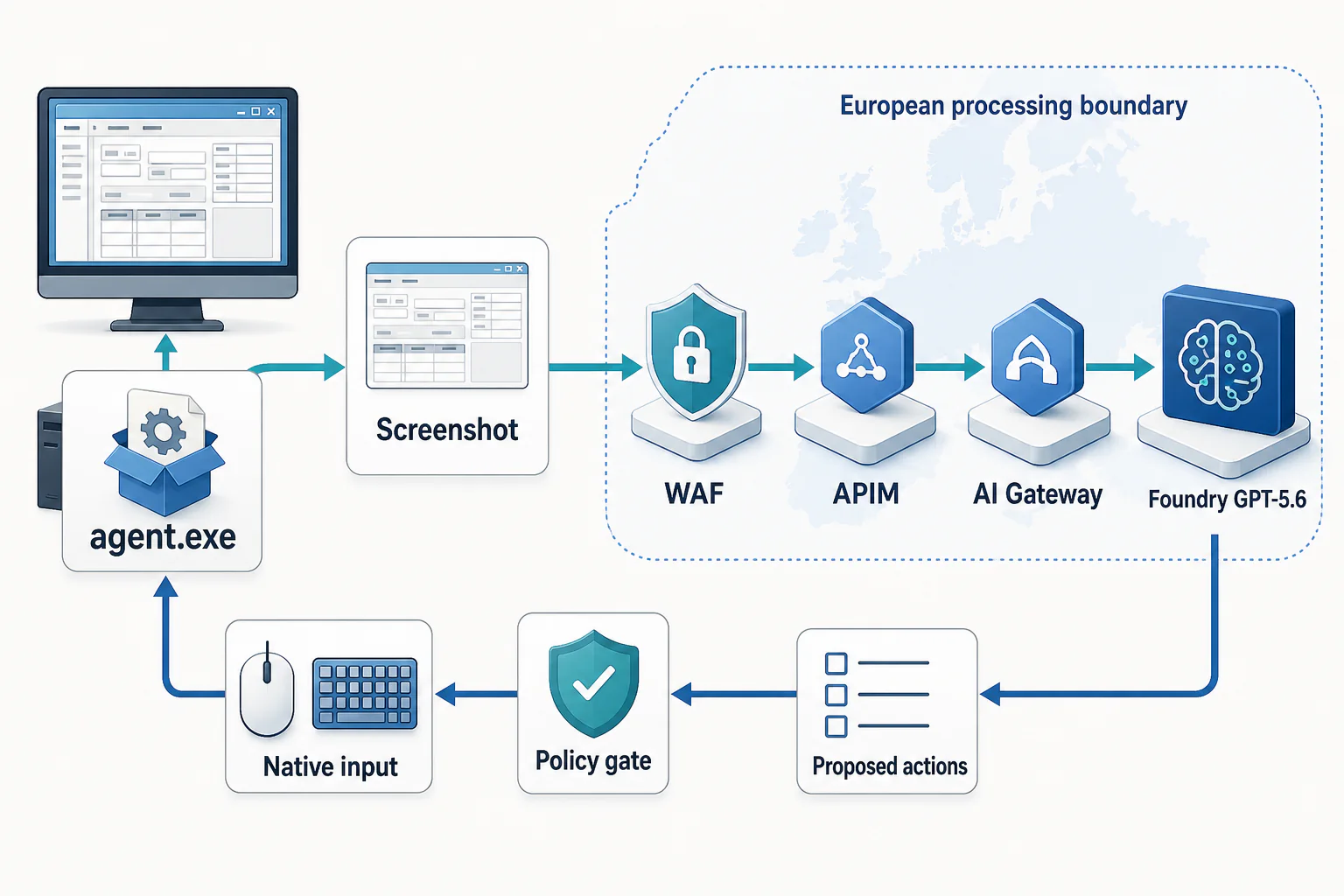
The outbound path is agent.exe → screenshot → WAF → APIM → AI Gateway → regional Foundry GPT-5.6 deployment. The return path contains proposed actions, not direct operating-system commands. The local policy gate validates each proposal before native input. A fresh screenshot then starts the next turn.
The harness accepts one named runtime profile. That profile binds the AI gateway endpoint, identity audience, navigation deployment, audit deployment, and allowed feature set. It rejects partial or mixed configurations.
from dataclasses import dataclass
from urllib.parse import urlparse


@dataclass(frozen=True)
class RegionalProfile:
    endpoint: str
    token_scope: str
    navigation_deployment: str
    audit_deployment: str
    approved_hosts: tuple[str, ...]

    def validate(self) -> None:
        host = urlparse(self.endpoint).hostname
        if host not in self.approved_hosts:
            raise ValueError("The AI gateway is not in the approved profile.")
        if not self.token_scope.endswith("/.default"):
            raise ValueError("The workload identity scope is invalid.")
In production, the approved profile points only to the reviewed European processing path. There is no automatic fallback to a public endpoint or another region. A failure stays a failure until the approved route is available again.
The rest of the data handling follows the same rule:
- workload identity replaces embedded API keys
- screenshots stay in memory unless recording is explicitly enabled
- model requests disable provider-side storage where the API supports it
- recorded JSON removes credentials and authorized identifiers
- screenshot recordings use synthetic or reviewed pixels before they enter the test corpus
- logs contain hashes and references instead of inline image payloads
This does not make sensitive processing safe by itself. It makes the intended boundary explicit, testable, and difficult to bypass by accident.
A Delivered Action Is Not a Successful Action
Desktop automation creates a retry problem that normal API code often avoids.
If an HTTP request fails before it leaves the caller, retrying can be safe. A mouse or keyboard batch is different. The operating system might receive all actions, some actions, or no actions before the harness loses visibility.
I use four execution states:
from enum import StrEnum


class ExecutionStatus(StrEnum):
    NOT_EXECUTED = "not_executed"
    EXECUTED = "executed"
    PARTIALLY_EXECUTED = "partially_executed"
    OUTCOME_UNCERTAIN = "outcome_uncertain"


def safe_to_retry(status: ExecutionStatus) -> bool:
    return status is ExecutionStatus.NOT_EXECUTED
Only not_executed is automatically safe to retry.
executed means that the host delivered every action and captured a fresh observation. It does not mean that the application reached the intended state. The next model turn or an independent audit must prove that from new evidence.
partially_executed and outcome_uncertain stop automatic recovery. Repeating the batch could duplicate an irreversible action or move the application into a state the model did not observe.
This distinction turned retry behavior from an implementation detail into a safety contract.
Semantic Gates Protect the Important Boundaries
Coordinate and process checks answer whether an action is mechanically allowed. They cannot prove that the application is showing the correct logical context.
For important transitions, the harness uses semantic gates. A gate examines a fresh screenshot and checks the visible facts required for that operation. Depending on the workflow, those facts can include the active view, a selected category, a record identifier, a row count, or the absence of a confirmation dialog.
Navigation remains model-led. The model does not need a second model to approve every click. The stronger checks sit at evidence and commitment boundaries, where a false positive would matter most.
That creates a useful split:
- ordinary navigation uses local mechanical policy
- data capture requires exact semantic evidence
- irreversible actions require explicit authorization and terminal proof
The harness fails closed when the evidence is incomplete. A blocked run is a valid result, not an exception that must be hidden with another retry.
Recording Real Runs Without Keeping Their Secrets
Unit tests cover validators and reducers well. They do not show whether a prompt change would alter a decision on a screen the agent previously encountered.
I added opt-in recording at the six phase boundaries. One run produces a versioned fixture directory with:
- screenshot files
- scrubbed model requests and responses
- gate inputs and decisions
- audit records
- phase outcomes
- causal execution receipts
- configuration, prompt, and scenario fingerprints
The recorder separates image bytes from JSON. It removes bearer tokens, credentials, authorized values, and task-specific identifiers from textual records. Screenshot pixels still need an explicit review because text can be visible inside the image itself.
Recording is disabled by default. It is enabled only for an approved validation session and written to a private local directory.
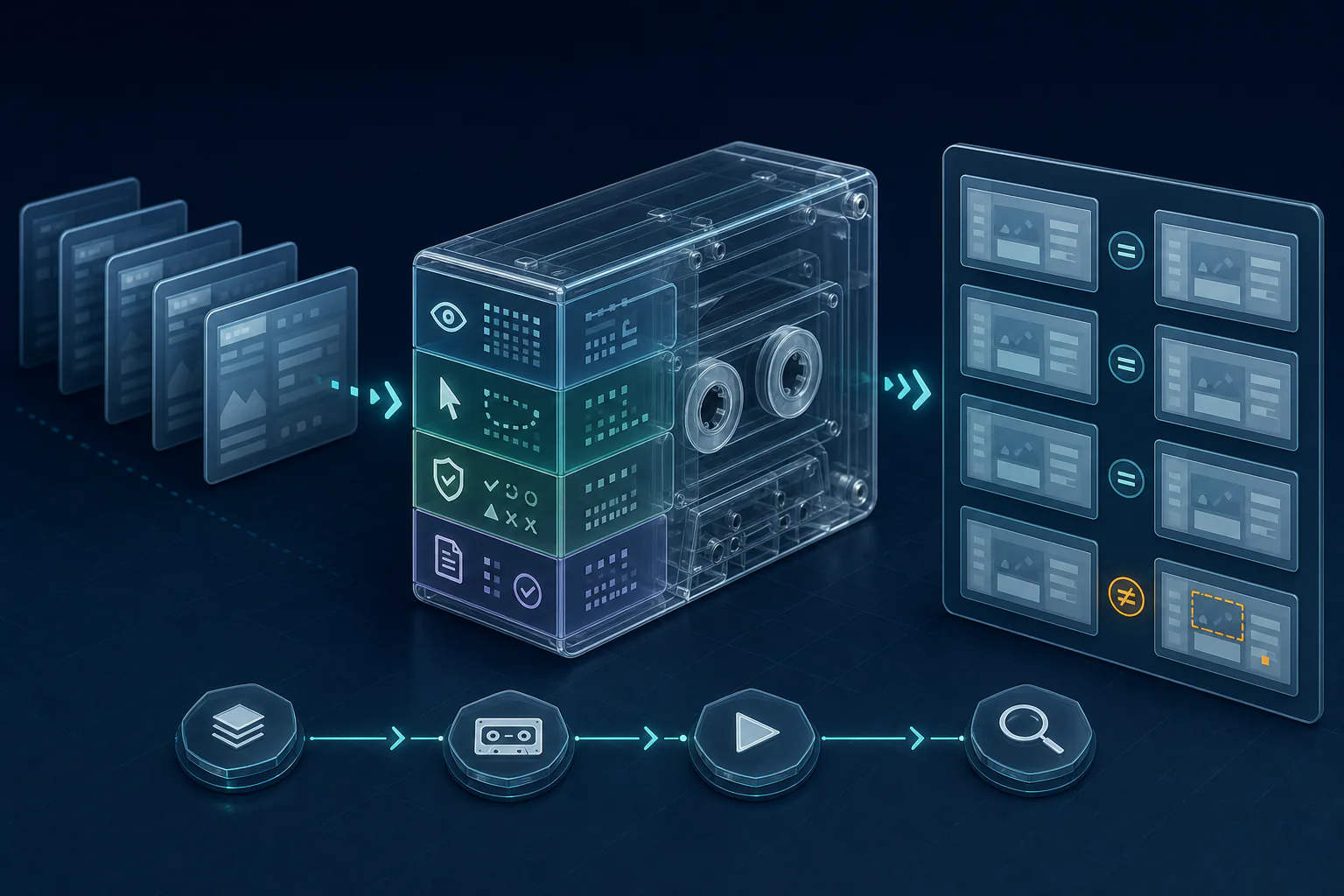
Replaying Decisions Without the Live Application
The replay harness does not try to simulate the whole desktop.
It reconstructs the deterministic parts of the system from recorded inputs:
- prompt construction
- gate issue detection
- audit fallback selection
- terminal decision structure
It then compares the current output with the recorded output.
from dataclasses import dataclass


@dataclass(frozen=True)
class ReplayCheck:
    phase: str
    recorded: str
    current: str


def verify_replay(checks: list[ReplayCheck]) -> None:
    changed = [check for check in checks if check.recorded != check.current]
    if changed:
        phases = ", ".join(check.phase for check in changed)
        raise AssertionError(f"Replay drift detected in: {phases}")
The actual report includes unified diffs, so a reviewer can see which prompt or decision changed.
Offline replay needs no desktop session, credentials, or model call. It can run in continuous integration and catch drift before the next live validation.
When a behavior change is intentional, rebaselining is a separate command. That makes fixture changes visible in review. A prompt snapshot does not silently update itself because the code changed.
Reliability Needs Repeated Evidence
A successful demonstration is useful, but it is not a reliability result.
The evaluation layer groups recordings only when they share the same scenario, model and settings, prompt fingerprint, screen geometry, and target mode. Duplicate fixture copies do not count as extra attempts. Each eligible run also needs evidence that the host executed a real non-wait input batch.
From there, the report can compare:
- completion and blocked outcomes
- elapsed time
- model-call count
- input and output tokens
- recovery activity
- terminal screenshots
- initial-screen fingerprints
- execution-receipt integrity
I use repeated runs because visual agents have real variance. The useful question is not whether the agent succeeded once. It is whether the same task succeeds from defined starting conditions, with bounded cost, and with understandable failures.
Screenshot Size Became a Measured Decision
Screenshots are both evidence and cost.
Sending every image at its native width can consume unnecessary input tokens. Shrinking them too far can hide the exact text that a semantic gate depends on.
I treat screenshot width as an experiment:
- Record eligible successful runs at native resolution.
- Render the same screenshots at several width caps without cropping.
- Check the exact gate-critical text at every size.
- Compare whole-run input tokens and cost across repeated replays.
- Select a smaller width only if it has zero semantic legibility failures.
An average recognition score is not sufficient. If one required identifier or count becomes ambiguous, that width fails the gate.
The selected width remains configuration. Native capture and input coordinates do not change. Only the copy sent to the model is downscaled.
The Harness Stayed Generic
The first workflow was specific, but the execution machinery did not need to be.
A task definition supplies its own contract, prompt material, result schema, semantic gates, and audit rules. The runner handles observations, proposals, validation, execution, recording, budgets, and terminal state in the same way for every task.
That means a new workflow should register its requirements instead of adding branches to the main loop.
The distinction matters. A reusable harness is not a universal agent. Each consequential workflow still needs its own explicit contract, adversarial tests, evidence rules, and authorization boundary.
What Changed by Shipping It
The first working version could navigate a difficult desktop application. The production-shaped version could explain and constrain how it did that.
It now has:
- a clear boundary between model reasoning and host authority
- regional processing enforced as one validated runtime profile
- target-window pinning and bounded native input
- explicit semantic and commitment gates
- causal receipts for every proposed action batch
- safe retry rules for partial and uncertain execution
- opt-in, scrubbed run recording
- deterministic offline replay
- explicit rebaselining for intended behavior changes
- repeated-run evaluation for reliability and cost
The model made the legacy interface adaptable. The Python harness made that adaptability operable.
That is the part I would reuse. When an application has no API and cannot be replaced yet, visual automation can bridge the gap. It becomes much more useful when the model is one component inside a smaller, stricter system that owns identity, region, evidence, and execution.